Windowsの試用期間が何回かリセットできる事を知ったのでメモメモ
slmgr.vbsっていう、MS純正スクリプトが最初からsystemフォルダにあるらしいです。
最初から環境パスに入っているので、プロンプトかファイル名を指定して実行で slmgr.vbsと打てば起動できます。
間違えて、slmgrと打つと、フォルダが開くだけなので注意;;
試しにslmgr.vbs -dlv を実行すると、

ちなみにEnterprise editionです。
リセット可能回数は3回までと、他のサイトで紹介されていましたが。
なぜか5回までリセット出来るようです。。
嬉しい! 有効期間は確か60日がリミットだったので
60日 x 5回 = 300日
だいたい300日もしないうちに、OSごとクリーン再インストールするので、つまりライセンス不要ってことですか??
追記: リセットされても8日ほどしか猶予は追加されませんでしたorz この数値もエディションごとに違うようなので注意です。
ちなみに、本題の有効期限をリセットするパラメータは-rearmです
slmgr.vbs -rearm
大喜びで、Serverの方で色々パラメータを試して遊んでいたら。
slmgr.vbs -upk
このコマンド試したら終わった。。
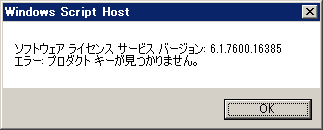
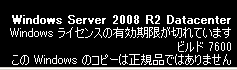
え?
焦って、MSのヘルプへ行くと、
この問題を解決をするには、次の方法のいずれかを使用します。
方法 1
検索の開始 </a0>] コマンド プロンプト を入力する コマンド プロンプト を右クリックして [ 管理者として実行 </a0>] をクリックします。
管理者: コマンド プロンプト ] ウィンドウで、次のようなコマンドを入力して Enter キーを押します。
cscript c:\windows\system32\slmgr.vbs – ipk {ProductKey}
メモ 組織で MAK キーの代わりに、KMS キーを使用して、いる場合は、Pid.txt ファイルで提供されているジェネリック KMS キーを使用します。 このファイルは、Windows Vista インストール DVD 上の \sources フォルダーにあります。
種類コマンドを次のようなして Enter キーを押します。
cscript c:\windows\system32\slmgr.vbs – ato
方法 2
「現象」に記載されているエラー メッセージををクリックしてします。
製品キーを入力して、プロダクト キーをアクティブに指示に従います。
方法 3
コンピュータを再起動してください。
コンピュータにログオンします。 Windows のライセンス認証 ウィンドウが表示されます。
製品キーを入力して、プロダクト キーをアクティブに指示に従います。
まてまて、プロダクトキー無いですから!
もともと評価版だった上に、評価用ProductKeyのメモとかしてないですから!
また近いうちに入れなおしかー@@
Serverの有効期限は180日なので、もし5回リセット出来るなら
180日 x 5回 = 900日
十分すぎる!
追記: やっぱそんな甘くなかった! linuxへ移住がいいみたい
というわけで、 slmgr.vbs -upk に注意。
追記2: エディション毎の有効期限
時々追加します
| エディション | リセット残り回数 | 有効期限 |
| Enterplise | 0回 | 10日 |
| Ultimate | 3回 | 30日 |
| Ultimate | 0回 | 25日? |
| Professional | 2回 | 30日 |
| 2008R2 | 5回 | 180日 |
悪用厳禁
悪用厳禁。
悪用厳禁。。
Yes! Finally something about design your own photo cards.
Feel free to visit my homepage … music online no download
I appreciate, cause I discovered just what I used to be looking for.
You have ended my four day long hunt! God Bless you
man. Have a great day. Bye
Thanks for finally talking about > slmgr -プロダクトキーが不要?
?- – Hello, idea < Loved it!
prodigious chart you keep
http://menshairremoval.i-medlab.com Thanks for that awesome posting. It saved MUCH time 🙂
Excellent post, I will be checking back regularly to look for updates. 🙂
Bookmarked, I love your blog! 🙂
Hello! Because it is an article that the access is a lot of, I will examine it in detail again. Thank you for coming!!
Hi, just required you to know I have added your web site to my Google bookmarks due to your extraordinary blog layout. But seriously, I think your website has 1 in the freshest theme I’ve came across. It quite helps make reading your blog a lot easier.
Sup! Incredibly good article! I’m also a regular website visitor (much like addict :P) of your website though I had a question. I am never totally sure if it is the right web site to ask, but you’ve got no spam comments. I recieve comments similar to that of watch movies online constantly. Are you going to you help me? Bless you.
Thank you for coming many times!
The thing not correctly displayed is not good.
It returns it to the theme before!
I’m sorry well, I like this domain very much though the domain. The sold thing cannot be done. I’m sorry.
Hello Z1 guy Mr.
I learnt the existence of slmgr on this site. http://www.atmarkit.co.jp/fwin2k/win2ktips/1074slmgr/slmgr.html
It played with Hyper-V Server 2008 just.
Where did you learn about this? Can you give me the reference?
Sent from my iPhone 4G
Ooohh, I am incredibly interest inside your domain. If I set up one internet site utilizing this domain, I can earn 100-200 USD daily. Your domain is quite good. If you don’t would like to sell this domain, I can cooperate with you over a condition which you share 50% earnings with me. 😀
Well, I agree with what you wrote, but not with all of it. Regardless, it’s all good material. Thanks!
Useful stuff, but the theme do not display properly on my Powerbook…maybe you need to check that out. Thanks, anyway.